| Dataset Dimensions | |
|---|---|
| rows_number | columns_number |
| 3000 | 22 |
Communicating a Data Modeling Analysis
Biagio Palese
The last step

We are at the end of our journey.. we finally reached the top
I know that

all of you feel better about R
We come a long way

Artwork by @allison_horst
Class Objective
- Review the steps used to complete a complete data analysis.
- Communicate the results of the complete data analysis.
Hotel Analysis Scenario
OptimaHotel Insights has been tasked by multiple hotel chains to develop a predictive model that can accurately forecast Average Daily Rates (ADR) based on various hotel features.
ADR Analysis Deliverables
- A comprehensive report/presentation detailing the entire data analysis.
- A fully functional predictive pricing model with satisfactory prediction accuracy.
- Offer strategic recommendations based on the model insights, feature importance, and predicted impacts on ADR.
Step 1: Exploring the Dataset
The hotel_data dataset used in this case study contains comprehensive information on various attributes and performance metrics of 3000 hotels across major U.S. cities.
It is meticulously curated1 to support predictive analyses focused on predicting and optimizing the average daily rate (ADR) for these properties.
This dataset includes realistic and detailed data, encompassing a wide range of features crucial for developing predictive pricing models.
| Dataset Glimpse | ||
|---|---|---|
| Column Name | Data Type | Example Values |
| id | numeric | 1, 2, 3 |
| num_rooms | numeric | 33, 71, 150 |
| location_quality | character | Excellent, Excellent, Good |
| star_rating | numeric | 1, 5, 3 |
| review_score | numeric | 1.84, 1.88, 2.93 |
| occupancy_rate | numeric | 71.65, 52.29, 97.43 |
| amenities_score | numeric | 3, 5, 1 |
| business_facilities | numeric | 0, 1, 1 |
| leisure_facilities | numeric | 1, 1, 1 |
| distance_to_city_center | numeric | 7.92, 4.85, 8.58 |
| average_daily_rate | numeric | 98.22, 98.73, 106.56 |
| city | character | Chicago, New York, Los Angeles |
| hotel_chain | character | Hilton, Hyatt, Marriott |
| month | numeric | 1, 5, 12 |
| season | character | Winter, Spring, Winter |
| number_of_bookings | numeric | 53, 61, 58 |
| revPAR | numeric | 70.37, 51.62, 103.82 |
| average_length_of_stay | numeric | 4.45, 3.09, 3.6 |
| competitors_average_price | numeric | 88.56, 84.46, 131.51 |
| transport_accessibility_score | numeric | 3.67, 6.3, 6.3 |
| customer_satisfaction_index | numeric | 81.57, 94.62, 91.12 |
| cancellation_rate | numeric | 0.01, 0.1, 0.14 |
| ADR Descriptive Stats | ||||
|---|---|---|---|---|
| min_average_daily_rate | avg_average_daily_rate | median_average_daily_rate | max_average_daily_rate | sd_average_daily_rate |
| 49.87 | 95.87045 | 95.825 | 141.83 | 14.98696 |
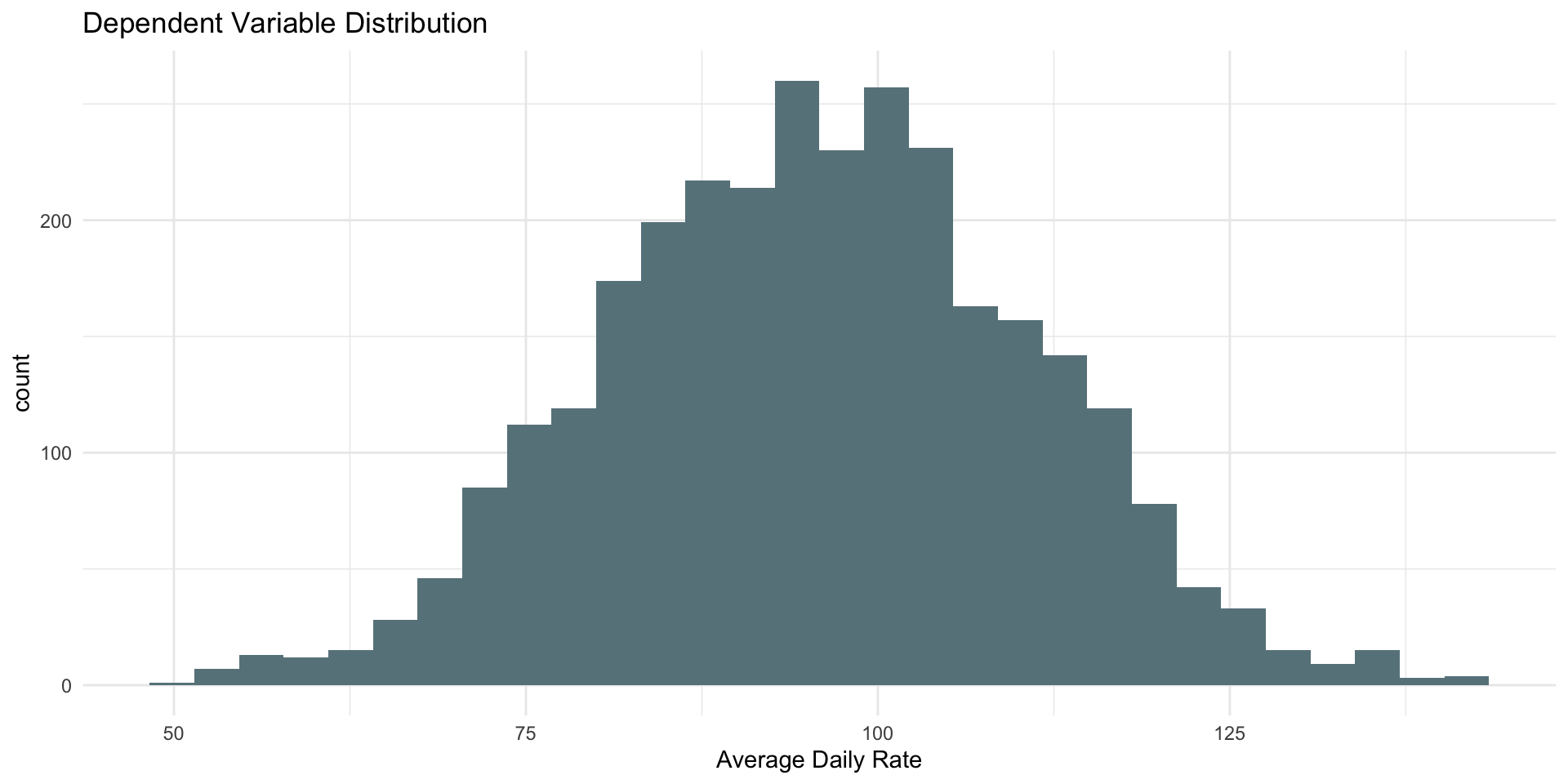
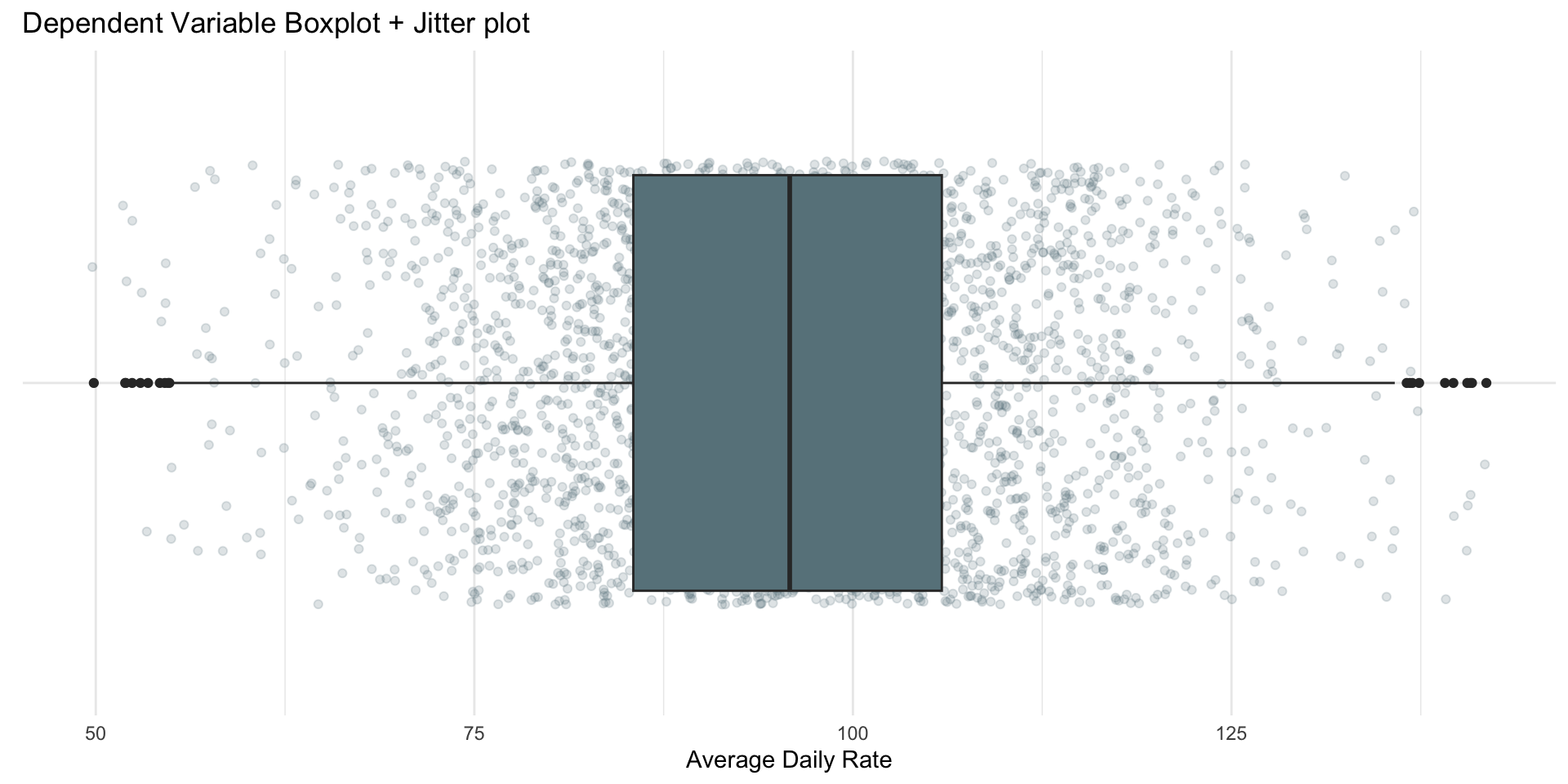
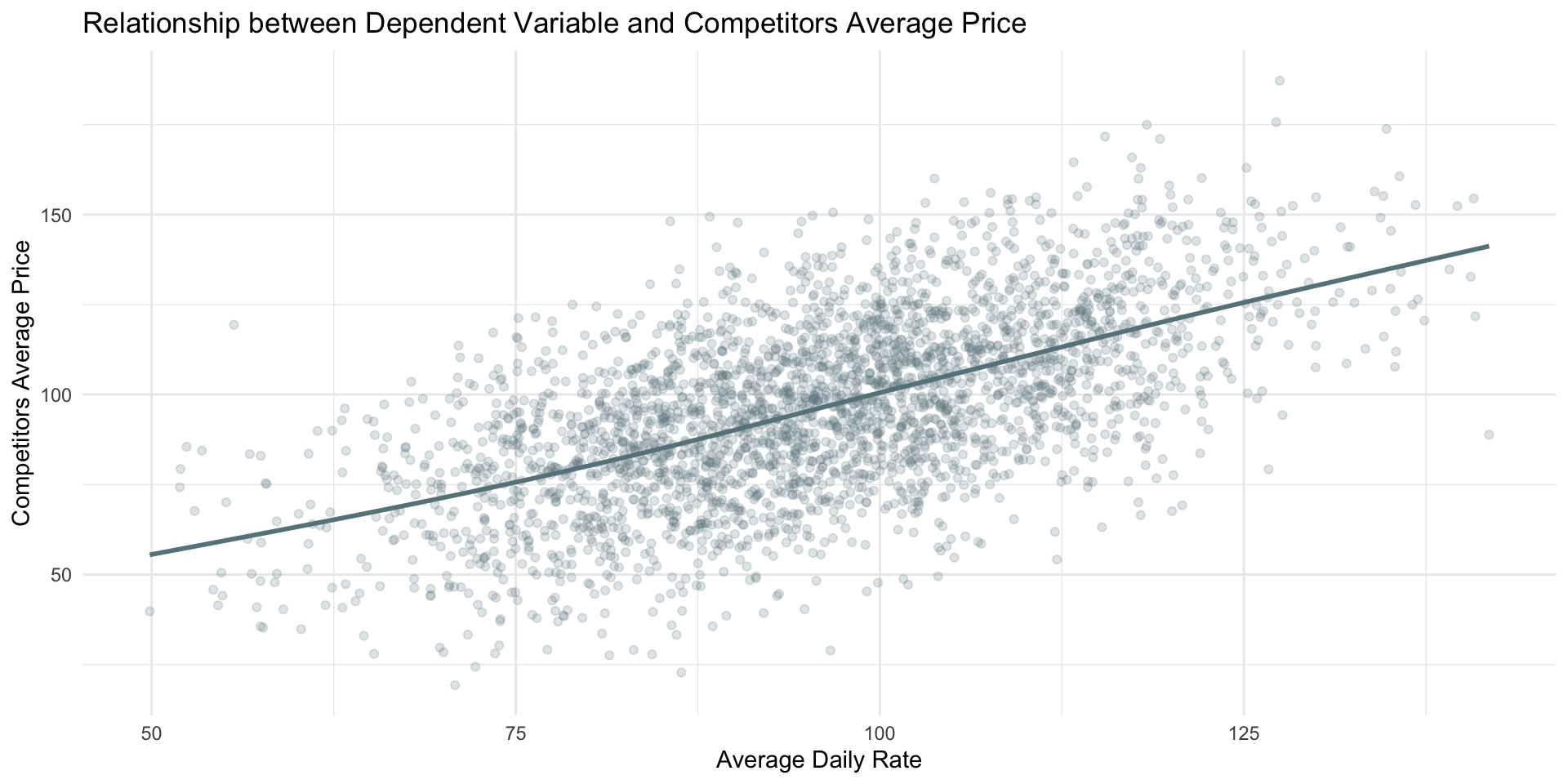
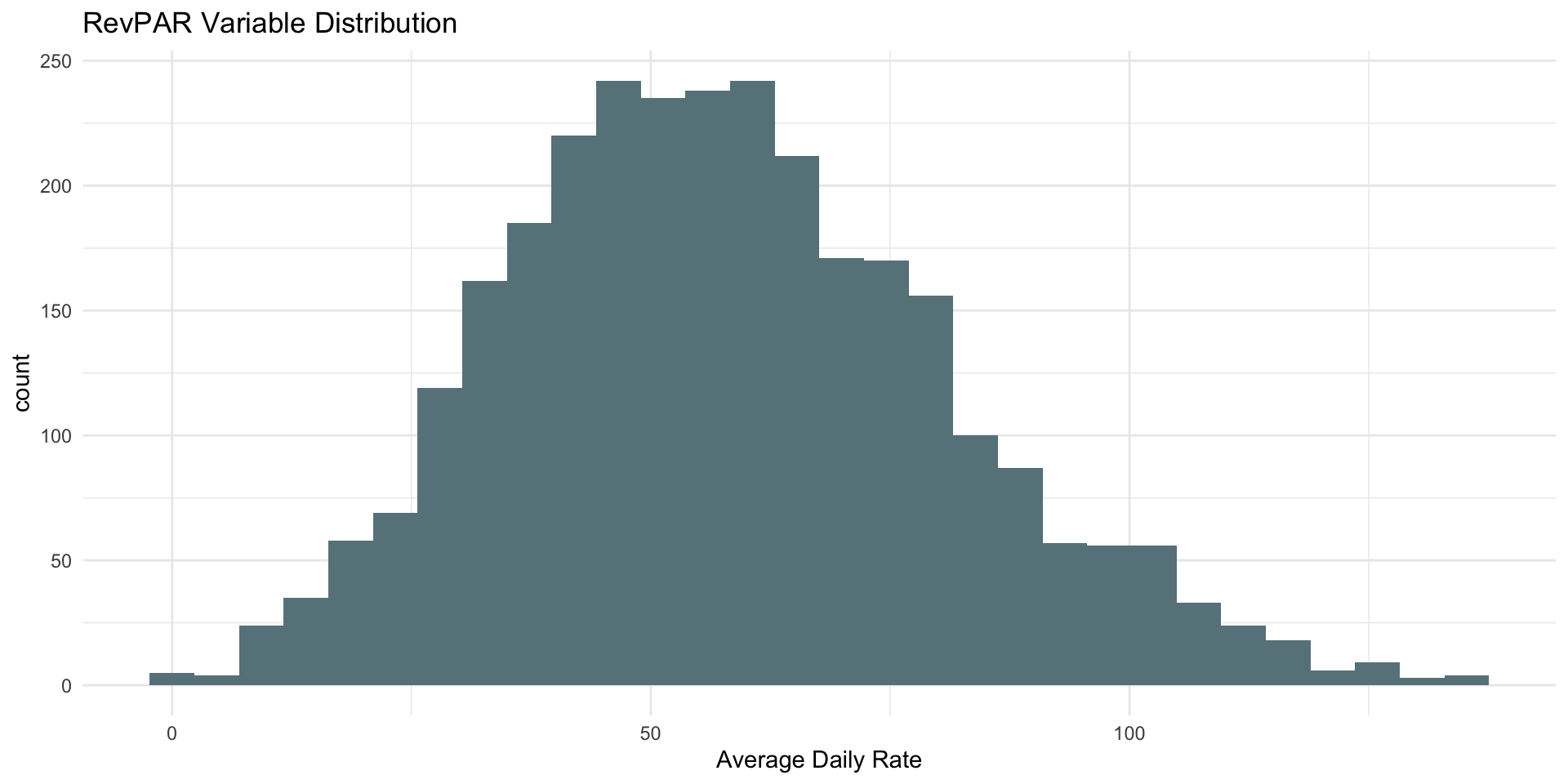
| ADR Descriptive Stats by City | |||||
|---|---|---|---|---|---|
| city | min_average_daily_rate | avg_average_daily_rate | median_average_daily_rate | max_average_daily_rate | sd_average_daily_rate |
| Chicago | 53.45 | 96.02526 | 96.045 | 141.83 | 15.48101 |
| Los Angeles | 49.87 | 95.56752 | 95.160 | 135.78 | 14.67615 |
| Miami | 54.23 | 96.19310 | 96.105 | 139.10 | 14.19395 |
| New York | 57.49 | 95.71646 | 95.930 | 140.88 | 15.10470 |
| San Francisco | 51.98 | 95.88067 | 96.085 | 140.77 | 15.45662 |
| ADR Descriptive Stats by Hotel Chain | |||||
|---|---|---|---|---|---|
| hotel_chain | min_average_daily_rate | avg_average_daily_rate | median_average_daily_rate | max_average_daily_rate | sd_average_daily_rate |
| Hilton | 55.12 | 95.92 | 96.00 | 140.77 | 15.51 |
| Hyatt | 54.78 | 95.28 | 95.08 | 141.83 | 15.24 |
| InterContinental | 51.94 | 96.31 | 96.67 | 139.10 | 14.70 |
| Marriott | 57.47 | 95.87 | 96.32 | 140.88 | 14.52 |
| Sheraton | 49.87 | 96.01 | 95.93 | 139.65 | 14.98 |
Step 2: Manipulating the Data
Based on the above exploration the following minor manipulations1 are required:
Step 3: Checking Correlations
Given that we are working on a new dataset and that we are not super familiar with hotel data, it is worth to take a look at the correlation of our numerical variables.
Correlation Matrix
| Correlation Matrix Arranged By ADR | |||||||||||||||||
|---|---|---|---|---|---|---|---|---|---|---|---|---|---|---|---|---|---|
| variables | average_daily_rate | num_rooms | star_rating | review_score | occupancy_rate | amenities_score | business_facilities | leisure_facilities | month | number_of_bookings | revPAR | average_length_of_stay | competitors_average_price | transport_accessibility_score | customer_satisfaction_index | cancellation_rate | miles_distance_to_city_center |
| average_daily_rate | 1.0000 | 0.0043 | 0.1443 | 0.0301 | 0.2323 | 0.0145 | 0.2832 | 0.4994 | -0.0110 | 0.0274 | 0.5704 | -0.0028 | 0.5749 | -0.0041 | -0.0271 | 0.0105 | 0.0031 |
| competitors_average_price | 0.5749 | -0.0096 | 0.0878 | 0.0044 | 0.1385 | 0.0080 | 0.1251 | 0.2872 | 0.0103 | 0.0047 | 0.3305 | 0.0074 | 1.0000 | -0.0087 | -0.0033 | 0.0163 | -0.0121 |
| revPAR | 0.5704 | 0.0071 | 0.0790 | 0.0221 | 0.9228 | 0.0000 | 0.1011 | 0.1582 | -0.0039 | -0.0080 | 1.0000 | -0.0181 | 0.3305 | -0.0175 | -0.0023 | 0.0076 | 0.0003 |
| leisure_facilities | 0.4994 | -0.0099 | 0.0177 | 0.0034 | -0.0350 | 0.0122 | -0.0179 | 1.0000 | -0.0263 | 0.0336 | 0.1582 | 0.0042 | 0.2872 | -0.0027 | -0.0247 | 0.0020 | -0.0020 |
| business_facilities | 0.2832 | -0.0061 | 0.0068 | -0.0195 | -0.0080 | -0.0383 | 1.0000 | -0.0179 | -0.0064 | -0.0125 | 0.1011 | -0.0120 | 0.1251 | -0.0008 | 0.0062 | -0.0243 | 0.0100 |
| occupancy_rate | 0.2323 | 0.0065 | 0.0254 | 0.0148 | 1.0000 | -0.0052 | -0.0080 | -0.0350 | 0.0014 | -0.0226 | 0.9228 | -0.0202 | 0.1385 | -0.0220 | 0.0076 | 0.0013 | -0.0005 |
| star_rating | 0.1443 | 0.0044 | 1.0000 | -0.0049 | 0.0254 | -0.0035 | 0.0068 | 0.0177 | 0.0258 | 0.0138 | 0.0790 | -0.0243 | 0.0878 | 0.0094 | -0.0128 | 0.0085 | 0.0235 |
| review_score | 0.0301 | 0.0123 | -0.0049 | 1.0000 | 0.0148 | 0.0063 | -0.0195 | 0.0034 | 0.0223 | 0.0129 | 0.0221 | -0.0317 | 0.0044 | -0.0135 | 0.0010 | -0.0464 | 0.0005 |
| number_of_bookings | 0.0274 | -0.0037 | 0.0138 | 0.0129 | -0.0226 | 0.0175 | -0.0125 | 0.0336 | -0.0371 | 1.0000 | -0.0080 | 0.0183 | 0.0047 | -0.0121 | 0.0009 | -0.0113 | 0.0100 |
| amenities_score | 0.0145 | -0.0318 | -0.0035 | 0.0063 | -0.0052 | 1.0000 | -0.0383 | 0.0122 | 0.0054 | 0.0175 | 0.0000 | -0.0304 | 0.0080 | -0.0131 | 0.0304 | -0.0188 | 0.0069 |
| cancellation_rate | 0.0105 | -0.0024 | 0.0085 | -0.0464 | 0.0013 | -0.0188 | -0.0243 | 0.0020 | -0.0157 | -0.0113 | 0.0076 | 0.0056 | 0.0163 | -0.0037 | 0.0051 | 1.0000 | 0.0042 |
| num_rooms | 0.0043 | 1.0000 | 0.0044 | 0.0123 | 0.0065 | -0.0318 | -0.0061 | -0.0099 | 0.0145 | -0.0037 | 0.0071 | -0.0222 | -0.0096 | 0.0135 | 0.0309 | -0.0024 | 0.0068 |
| miles_distance_to_city_center | 0.0031 | 0.0068 | 0.0235 | 0.0005 | -0.0005 | 0.0069 | 0.0100 | -0.0020 | -0.0129 | 0.0100 | 0.0003 | -0.0263 | -0.0121 | 0.0089 | -0.0117 | 0.0042 | 1.0000 |
| average_length_of_stay | -0.0028 | -0.0222 | -0.0243 | -0.0317 | -0.0202 | -0.0304 | -0.0120 | 0.0042 | -0.0223 | 0.0183 | -0.0181 | 1.0000 | 0.0074 | 0.0238 | -0.0063 | 0.0056 | -0.0263 |
| transport_accessibility_score | -0.0041 | 0.0135 | 0.0094 | -0.0135 | -0.0220 | -0.0131 | -0.0008 | -0.0027 | -0.0254 | -0.0121 | -0.0175 | 0.0238 | -0.0087 | 1.0000 | -0.0210 | -0.0037 | 0.0089 |
| month | -0.0110 | 0.0145 | 0.0258 | 0.0223 | 0.0014 | 0.0054 | -0.0064 | -0.0263 | 1.0000 | -0.0371 | -0.0039 | -0.0223 | 0.0103 | -0.0254 | 0.0193 | -0.0157 | -0.0129 |
| customer_satisfaction_index | -0.0271 | 0.0309 | -0.0128 | 0.0010 | 0.0076 | 0.0304 | 0.0062 | -0.0247 | 0.0193 | 0.0009 | -0.0023 | -0.0063 | -0.0033 | -0.0210 | 1.0000 | 0.0051 | -0.0117 |
Step 4: Data Splitting
When it comes to supervised data modeling one of the most adopted method to evaluate multiple models is to split the data into a training set and a test set from the beginning.
Hotel train
| Training Dataset Dimensions | |
|---|---|
| rows_number | columns_number |
| 2192 | 22 |
Hotel test
| Test Dataset Dimensions | |
|---|---|
| rows_number | columns_number |
| 731 | 22 |
Step 5: Setting up the Recipes
Creating recipes is a critical step because it allows to define the model formula and specify any preprocessing steps to the original dataset.
Recipe 1
Recipe 2
Recipe 3
Step 6: Specifying the Models
We specify two models using parsnip:
a
lmenginelinear regression;a
glmnetenginelasso regression1.
Model 1
Model 2
Step 7: Fitting Models using Workflows
Next, we fit the models to the hotel_train dataset, so that we can compare their predictions performance on hotel_test.
This is accomplished by embedding the model specifications within workflows that also incorporate our preprocessing recipes.
Lasso recipe 3 model workflow
Lasso recipe 3 model workflow output
══ Workflow [trained] ══════════════════════════════════════════════════════════
Preprocessor: Recipe
Model: linear_reg()

── Preprocessor ────────────────────────────────────────────────────────────────
1 Recipe Step

• step_dummy()

── Model ───────────────────────────────────────────────────────────────────────

Call:  glmnet::glmnet(x = maybe_matrix(x), y = y, family = "gaussian",      alpha = ~1)

   Df  %Dev Lambda
1   0  0.00 8.0810
2   2  8.03 7.3630
3   2 15.16 6.7090
4   3 21.82 6.1130
5   3 28.36 5.5700
6   3 33.80 5.0750
7   3 38.31 4.6240
8   3 42.06 4.2130
9   3 45.17 3.8390
10  3 47.75 3.4980
11  3 49.89 3.1870
12  4 52.07 2.9040
13  4 54.14 2.6460
14  4 55.86 2.4110
15  4 57.28 2.1970
16  5 58.72 2.0020
17  5 60.01 1.8240
18  5 61.09 1.6620
19  6 62.14 1.5140
20  6 63.02 1.3800
21  7 65.04 1.2570
22  7 69.61 1.1450
23  7 73.40 1.0440
24  7 76.56 0.9510
25  8 79.21 0.8665
26  9 81.38 0.7895
27  9 83.19 0.7194
28  9 84.70 0.6555
29  9 85.96 0.5972
30  9 87.00 0.5442
31  9 87.86 0.4958
32  9 88.58 0.4518
33  9 89.18 0.4117
34  9 89.67 0.3751
35  9 90.09 0.3418
36  9 90.43 0.3114
37  9 90.71 0.2837
38  9 90.95 0.2585
39 10 91.15 0.2356
40 10 91.31 0.2146
41 10 91.45 0.1956
42 10 91.57 0.1782
43 10 91.66 0.1624
44 11 91.74 0.1479
45 12 91.81 0.1348
46 14 91.87 0.1228

...
and 26 more lines.
Step 8: Making Predictions
Then we use the models built on the training set to make predictions on our test set.
By doing so we will have both the actual values and the predicted values and we can assess the model performance.
Lasso recipe 3 model actual ADR values vs predicted
| ADR actual vs predicted values | |
|---|---|
| adr | pred_adr |
| 104.940000 | 104.782852 |
| 97.320000 | 96.591127 |
| 68.120000 | 79.503404 |
| 108.070000 | 111.700405 |
| 114.530000 | 104.066156 |
| 118.040000 | 110.767541 |
| 109.080000 | 106.135489 |
| 104.270000 | 106.979850 |
| 66.850000 | 76.432982 |
| 73.480000 | 80.028296 |
Step 9: Assess Models Performance
While seeing the predictions next to the actual values can already provide some insights on the goodness of the model.
In regression analysis, model performance is evaluated using specific metrics that quantify the model’s accuracy and ability to generalize.
Three fundamental metrics are Root Mean Squared Error (RMSE), Mean Absolute Error (MAE), and R-squared (R²).
| Full Metrics Table | ||
|---|---|---|
| .metric | .estimate | model |
| mae | 2.9318 | reg_model_recipe3 |
| mae | 2.9770 | lasso_model_recipe3 |
| mae | 7.9723 | lasso_model_recipe2 |
| mae | 7.9748 | reg_model_recipe2 |
| mae | 8.2290 | reg_model_recipe1 |
| mae | 8.2325 | lasso_model_recipe1 |
| rmse | 4.0948 | reg_model_recipe3 |
| rmse | 4.1122 | lasso_model_recipe3 |
| rmse | 9.7966 | reg_model_recipe2 |
| rmse | 9.8012 | lasso_model_recipe2 |
| rmse | 10.1661 | reg_model_recipe1 |
| rmse | 10.1682 | lasso_model_recipe1 |
| rsq | 0.4687 | reg_model_recipe1 |
| rsq | 0.4687 | lasso_model_recipe1 |
| rsq | 0.5067 | reg_model_recipe2 |
| rsq | 0.5068 | lasso_model_recipe2 |
| rsq | 0.9138 | reg_model_recipe3 |
| rsq | 0.9145 | lasso_model_recipe3 |
By looking at the metrics table recipe 3 lasso is the best model. We excluded the recipe 3 regression model because of a warning highlighting issues during its fit.
| Full Metrics Table with Best Model | ||
|---|---|---|
| .metric | .estimate | model |
| mae | 2.9318 | reg_model_recipe3 |
| mae | 2.9770 | lasso_model_recipe3 |
| rmse | 4.0948 | reg_model_recipe3 |
| rmse | 4.1122 | lasso_model_recipe3 |
| rsq | 0.9138 | reg_model_recipe3 |
| rsq | 0.9145 | lasso_model_recipe3 |
Step 10: Visualizing Prediction Results
Visualizing the prediction results can provide additional insights into model performance.
You should plot the predicted vs actual values and the residuals to visually assess how well the model is capturing the underlying relationship in the data.
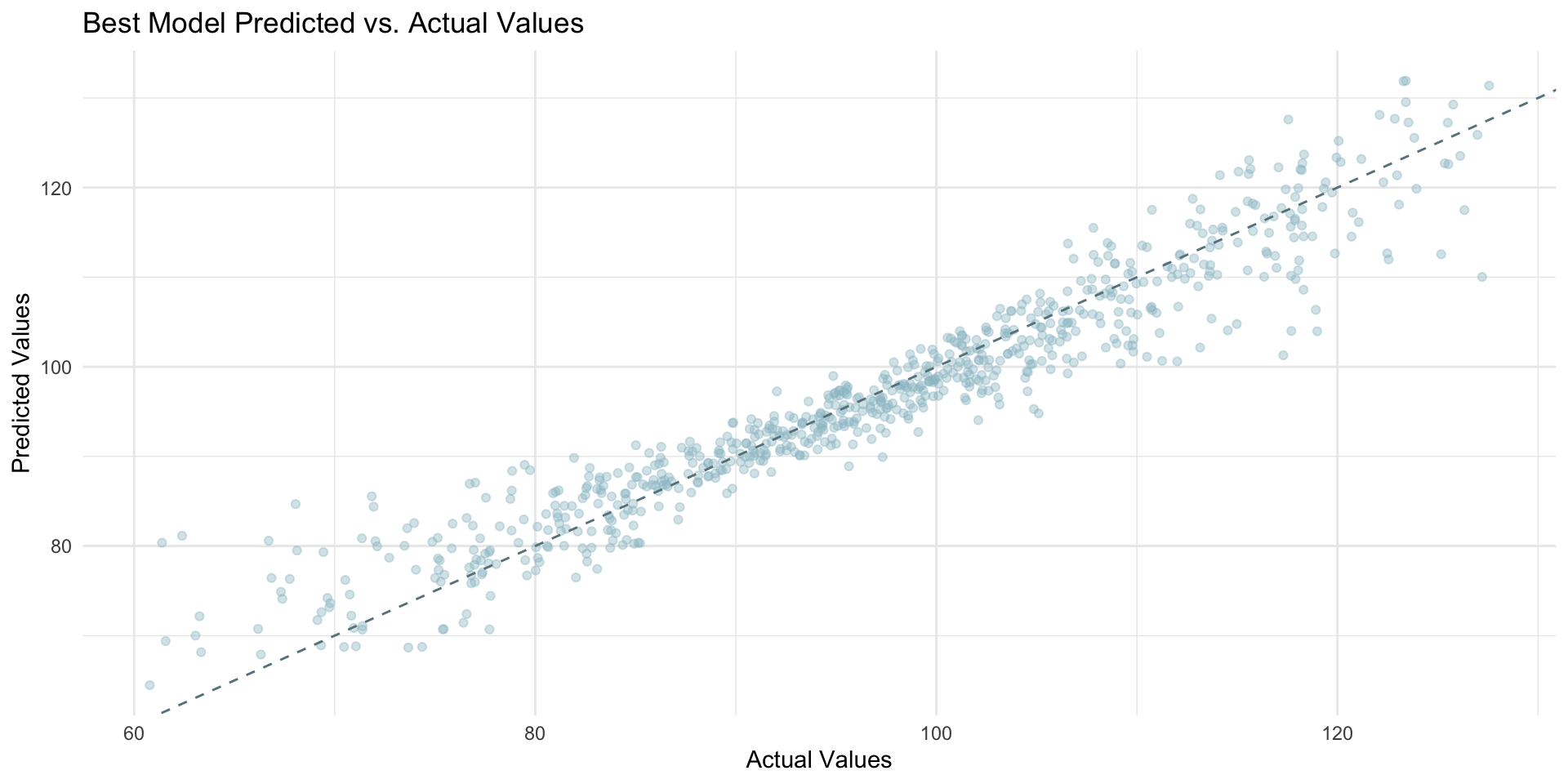
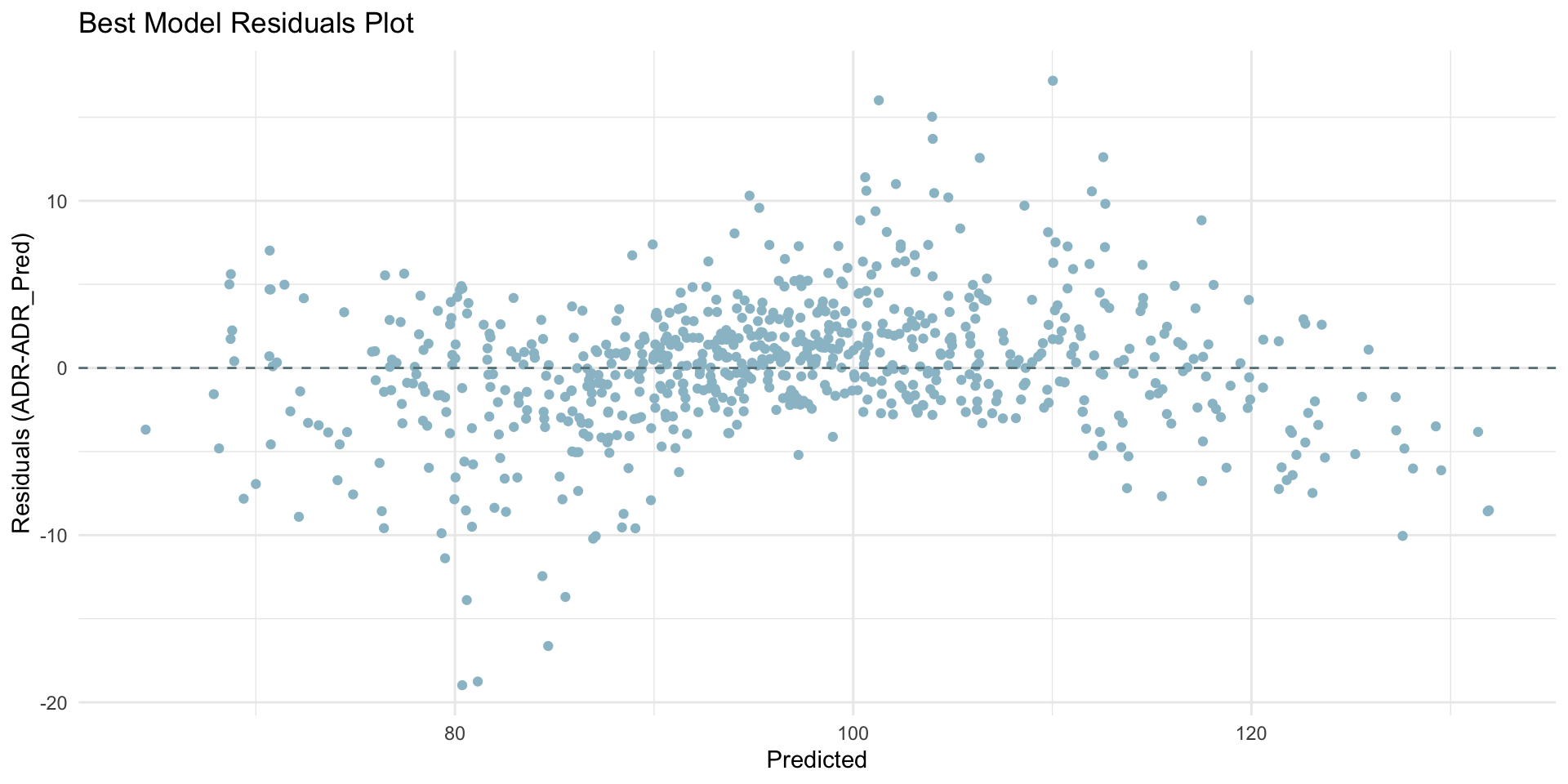
The charts above clearly show how overall the best model does a pretty good job in predicting our dependent variable.
However, there is room for improvement because in both charts we noticed some deviation from the desired line.
Visual interpretations provide valuable insights into model performance but should be complemented with quantitative metrics (like RMSE, MAE and R²) for a comprehensive evaluation.
The plots help identifying patterns or biases not immediately apparent from numerical metrics alone.
Step 11: Model Interpretation
Given that recipe3 lasso regression model gives the best prediction results both in terms of metrics and visualizations.
We can then conclude that this model is the best/most optimal model among those tested. Thus, we will proceed to interpret its results.
Zero Coefficients Variables do not have a statistically significant linear relationship with ADR after accounting for other variables and the regularization penalty.
| Removed Predictors | ||
|---|---|---|
| term | estimate | penalty |
| num_rooms | 0.000000 | 0.100000 |
| month | 0.000000 | 0.100000 |
| number_of_bookings | 0.000000 | 0.100000 |
| average_length_of_stay | 0.000000 | 0.100000 |
| transport_accessibility_score | 0.000000 | 0.100000 |
| miles_distance_to_city_center | 0.000000 | 0.100000 |
| city_Los.Angeles | 0.000000 | 0.100000 |
| city_Miami | 0.000000 | 0.100000 |
| city_New.York | 0.000000 | 0.100000 |
| city_San.Francisco | 0.000000 | 0.100000 |
| hotel_chain_Hyatt | 0.000000 | 0.100000 |
| hotel_chain_Marriott | 0.000000 | 0.100000 |
| hotel_chain_Sheraton | 0.000000 | 0.100000 |
| season_Spring | 0.000000 | 0.100000 |
| season_Summer | 0.000000 | 0.100000 |
| season_Winter | 0.000000 | 0.100000 |
Non-Zero Coefficients Variables are influencing factors for ADR and should be considered in pricing strategies.
| Included Predictors | ||
|---|---|---|
| term | estimate | penalty |
| (Intercept) | 83.405263 | 0.100000 |
| star_rating | 0.171419 | 0.100000 |
| review_score | 0.106057 | 0.100000 |
| occupancy_rate | −1.143306 | 0.100000 |
| amenities_score | 0.015416 | 0.100000 |
| business_facilities | 1.707039 | 0.100000 |
| leisure_facilities | 2.757357 | 0.100000 |
| revPAR | 1.243648 | 0.100000 |
| competitors_average_price | 0.052455 | 0.100000 |
| customer_satisfaction_index | −0.004978 | 0.100000 |
| cancellation_rate | −0.569816 | 0.100000 |
| location_quality_Excellent | 1.888997 | 0.100000 |
| location_quality_Good | 0.951980 | 0.100000 |
| location_quality_Poor | −0.754707 | 0.100000 |
| hotel_chain_InterContinental | 0.000330 | 0.100000 |
Intercept: $83.4 represent the expected ADR when the categorical predictors are in their baseline category (the first value in alphabetical order) and the numerical predictors are zero or at their lowest practical/observed levels.
| Intercept Only Table | |
|---|---|
| term | estimate |
| (Intercept) | 83.405263 |
Star Rating: For one additional star, ADR increases by approximately $0.171, assuming all other variables remain constant.
This means that moving from 1-star to a 5-star hotel, which is an increase of 4 stars, would lead to an estimated increase of 0.171 x 4 = $0.684 in ADR1.
| Star Rating Only Table | |
|---|---|
| term | estimate |
| star_rating | 0.171419 |
Review Score: For one point increase in the review score (on a scale of 1 to 5), ADR increases by $0.106 given all other variables staying constant.
| Review Score Only Table | |
|---|---|
| term | estimate |
| review_score | 0.106057 |
This shows the value customers place on higher-rated hotels, which can command higher prices but the impact is surprisingly small.
Occupancy Rate: For one percentage point increase in occupancy rate, ADR decreases by $1.14. Surprisingly, higher occupancy rates do not correspond with higher ADR.
| Occupancy Rate Only Table | |
|---|---|
| term | estimate |
| occupancy_rate | −1.143306 |
It’s possible that in an effort to maintain high occupancy levels, hotels might be underpricing their rooms, thus not maximizing potential revenue.
Business Facilities & Leisure Facilities: Hotels with business and leisure facilities can charge an additional $1.71 and $2.76, respectively, on ADR.
| Business Facilities & Leisure Facilities Only Table | |
|---|---|
| term | estimate |
| business_facilities | 1.707039 |
| leisure_facilities | 2.757357 |
However, these amenities impact does not seem substantial at first glance, particularly when considering the potential costs associated with maintaining them.
RevPAR (Revenue per Available Room): This variable is an important hospitality metrics. RevPAR combines the effects of room rates and occupancy levels. For one dollar increase in RevPAR, ADR increases by $1.24.
| RevPAR Only Table | |
|---|---|
| term | estimate |
| revPAR | 1.243648 |
Competitors Average Price: For one dollar increase in competitors' average prices, ADR increases by only $0.0525.
| Competitors Average Price Only Table | |
|---|---|
| term | estimate |
| competitors_average_price | 0.052455 |
The strategy of not matching the price increases fully could reflect a positioning approach where hotels aim to offer slightly lower prices to attract price-sensitive customers or to increase market share by becoming a more economical option within their competitive set.
Customer Satisfaction Index: For every one-unit increase in the customer satisfaction index, ADR decreases by approximately $0.005, assuming other factors remain constant.
| Customer Satisfaction Index Only Table | |
|---|---|
| term | estimate |
| customer_satisfaction_index | −0.004978 |
The negative coefficient suggests a potential under utilization of customer satisfaction. Thus, increases in customer satisfaction do not translate into higher ADR.
Cancellation Rate: For each percentage point increase in cancellation rates, ADR decreases by $0.570.
| Cancellation Rate Only Table | |
|---|---|
| term | estimate |
| cancellation_rate | −0.569816 |
While this drop in price can mitigate the risk of empty rooms, it also suggests potential revenue losses or instability in booking patterns.
Location Quality: Being in an Excellent location increases the ADR by $1.89, while being in a Good location increases it by $0.952, compared to our baseline, Average location.
| Location Quality Only Table | |
|---|---|
| term | estimate |
| location_quality_Excellent | 1.888997 |
| location_quality_Good | 0.951980 |
| location_quality_Poor | −0.754707 |
Being in a Poor location decreases it by $0.755 compared to Average. Hotels are clearly underselling their premium locations.
Step 12: Making Real Predictions
Once you have assessed the model prediction performance and interpreted the results, the final step is to use the best/most optimal model to make predictions on a hotel dataset that does not contain ADR.
New dataset ADR predictions
| New Hotel Data ADR Values Predictions |
|---|
| forecasted_adr |
| 112.140946 |
| 241.006373 |
| 113.691424 |
| 68.688388 |
| 140.039062 |
| 137.975722 |
| 63.926277 |
| 86.710203 |
| 170.197796 |
| 63.491527 |
For the great semester

The sky is the limit if you become an